Sarena CNI plugin
Kubernetes defines several interfaces (CNI, CSI, and CRI) to make different parts of the system extensible. This blog briefly discusses CNI and, more specifically, how Sarena uses it. It is not the intention of this blog to describe all the ins and outs of CNI or cover every possible edge case.
The Container Network Interface (CNI) is a simple contract between a container runtime and a network plugin. Its purpose is to configure network connectivity for containers and to clean up that connectivity when a container is removed.
There are many CNI plugins available, including Cilium, Calico, Flannel, and many others, each with its own features and design choices. This is one of the strengths of CNI: rather than putting a single, fixed network implementation into Kubernetes itself, Kubernetes defines an interface and lets a plugin implementing that interface perform the actual network setup. This separation of concerns is one of the reasons CNI has become widely used for container networking.
CNI is not tied to Kubernetes. The CNI project is hosted by the Cloud Native Computing Foundation (CNCF), and Kubernetes is one of the systems that uses it. Other container runtimes and container infrastructure can use CNI as well.
What a CNI plugin actually is
A CNI plugin is a plain executable that the container runtime executes when pod networking needs to be configured, checked, or removed. It is a short-lived process: the runtime starts it for an operation, waits for it to complete, collects the result, and then the process exits.
Because a CNI plugin is a short-lived process, it cannot keep state, listen on a socket, or perform other long-lived functionality. That is the purpose of the Sarena daemon, which is a long-lived process responsible for maintaining state. The daemon is also responsible for loading eBPF programs onto the relevant interfaces.
In essence, there are two interfaces that are important here. The first is the CNI, the standardized interface between the container runtime and the Sarena plugin. The second is a Sarena-specific interface between the Sarena plugin and the Sarena daemon. This interface is a small REST API that uses either Unix domain sockets or TCP. Unlike CNI, this interface is specific to Sarena and may evolve as the project develops.
The Sarena CNI plugin is based on the rscni-plugin crate. The crate handles the CNI protocol plumbing and passes control to SarenaPlugin, where the Sarena-specific logic lives.
When the container runtime invokes a CNI plugin, it provides environment variables and stdin to specify the operation and provide the plugin’s configuration.
The plugin returns the result through stdout and communicates failures through its exit code and stderr.

How it’s invoked: environment and config
As described earlier, when the runtime invokes a CNI plugin, it provides the input parameters through environment variables and stdin. The rscni-plugin crate, which the Sarena plugin is based on, parses these inputs into an Args struct and passes it to SarenaPlugin.
The environment variables carry information needed to configure networking for a specific container (a Pod), and therefore change with each invocation. The data provided through stdin, on the other hand, contains the configuration of the plugin. This configuration is not specific to a particular container and generally remains the same across invocations unless the CNI configuration itself changes.
Environment variables
The environment variables passed by the runtime could for example be:
CNI_COMMAND=ADD
CNI_CONTAINERID=abc123
CNI_NETNS=/proc/12345/ns/net
CNI_IFNAME=eth0
CNI_ARGS=IgnoreUnknown=1;K8S_POD_NAMESPACE=default;K8S_POD_NAME=web-abc
The standard CNI_* variables provide information that a CNI plugin can use regardless of which container runtime invokes it:
CNI_COMMAND— the operation the plugin should perform (ADD,DEL,CHECK,STATUS,GCorVERSION)CNI_CONTAINERID— the runtime’s sandbox Id.CNI_NETNS— path to the container network namespace, e.g./var/run/netns/cni-<uuid>CNI_IFNAME— the interface name to create inside the pod, almost alwayseth0.CNI_PATH— directories the runtime searched for plugin binaries.CNI_ARGS— additional arguments passed to the plugin asKEY=value;KEY=valuepairs.
As noted in the introduction, CNI is not tied to Kubernetes; other container runtimes can use the specification as well. Therefore, Kubernetes-specific information is not defined as additional CNI_* environment variables. Instead, Kubernetes and other runtimes can use CNI_ARGS to pass information that is specific to their environment.
For example, Kubernetes may include the following arguments:
K8S_POD_NAMESPACE- the namespace of the PodK8S_POD_NAME- the name of the PodK8S_POD_UID- The Uid of the PodIgnoreUnknown=1- indicates that the plugin may ignore arguments it does not understand.
The config file (stdin)
The runtime passes the network configuration to the CNI plugin through stdin. In practice, the runtime reads the CNI network configuration from /etc/cni/net.d and uses the selected configuration to determine which plugin, or plugin chain, to invoke.
For Sarena, the configuration is a .conflist file containing:
{
  "cniVersion": "1.0.0",
  "name": "sarena",
  "plugins": [
    {
      "type": "sarena-cni",
      "enable-debug": true,
      "log-file": "/var/log/sarena-cni.log"
    }
  ]
}
A .conflist has a CNI-defined header followed by a list of plugins.
The header contains:
cniVersion- the version of the CNI specification the configuration conforms to.rscni-pluginchecks this value.name— the name of the network configuration.
The plugins array contains the plugins that make up the network configuration. Each plugin entry contains at least:
type— The name of the CNI plugin binary to execute. The runtime locates this binary in one of the directories inCNI_PATH.
The remaining fields in Sarena’s plugin entry are Sarena-specific configuration options; they are not defined by the CNI specification:
enable-debug(bool) — enables debug-level logging.log-file(string) — specifies where the plugin writes its logs.daemon-endpoint(string, optional) — overrides the default daemon endpoint, such as the Unix socket or TCP endpoint. If omitted, Sarena uses its well-known Unix socket.
A plugin may also receive a prevResult field when it is part of a plugin chain. This contains the result produced by the preceding plugin and allows the next plugin to build on it. Sarena currently does not support chaining, so it does not use prevResult.
Operations performed by the plugin
The CNI specification defines several operations that a plugin may be asked to perform. The requested operation is provided through the CNI_COMMAND environment variable:
-
ADD— Tells the plugin to set up networking for a given container. This includes creating and configuring the container’s network interfaces and connecting it to the requested network. This is the main operation performed by the Sarena plugin and is discussed in the following sections. -
DEL— Tells the plugin to tear down the networking previously configured byADD. The plugin should remove the resources it created for the container.DELmust be safe to call even when some or all of the expected resources have already been removed. -
CHECK— Asks the plugin to verify that the networking configuration for a container is still consistent with the configuration previously applied byADD. UnlikeADD,CHECKshould not modify the network configuration; it is intended to detect configuration drift or missing resources. Support forCHECKis optional, but Sarena implements it. -
STATUS— Asks the plugin to report whether it is healthy and able to perform its operations. This is a plugin-level operation rather than an operation on a particular container. It can be used by the runtime to determine whether the plugin is ready to handle CNI requests. Support forSTATUSis optional, but Sarena implements it. -
GC— Asks the plugin to perform garbage collection of unused resources. The operation is intended to clean up resources that were allocated by the plugin but are no longer associated with an active container or network configuration. Support forGCis optional. Sarena does not implement garbage collection; so this operation is simply a no-op. -
VERSION— Asks the plugin to report the CNI specification versions it supports. Unlike the other operations, this does not configure or inspect a container’s networking.VERSIONis handled entirely by rscni-plugin.
Since VERSION is handled by rscni-plugin and GC is not used by Sarena, the four remaining operations are relevant to Sarena and are discussed below. ADD is by far the most involved operation, so it is discussed in more detail.
ADD, in detail
Before invoking the CNI plugin to add a container to the network, the runtime has already created a fresh, empty network namespace, along with some other resources that are less relevant to this discussion. It then invokes the plugin as described in the previous sections.
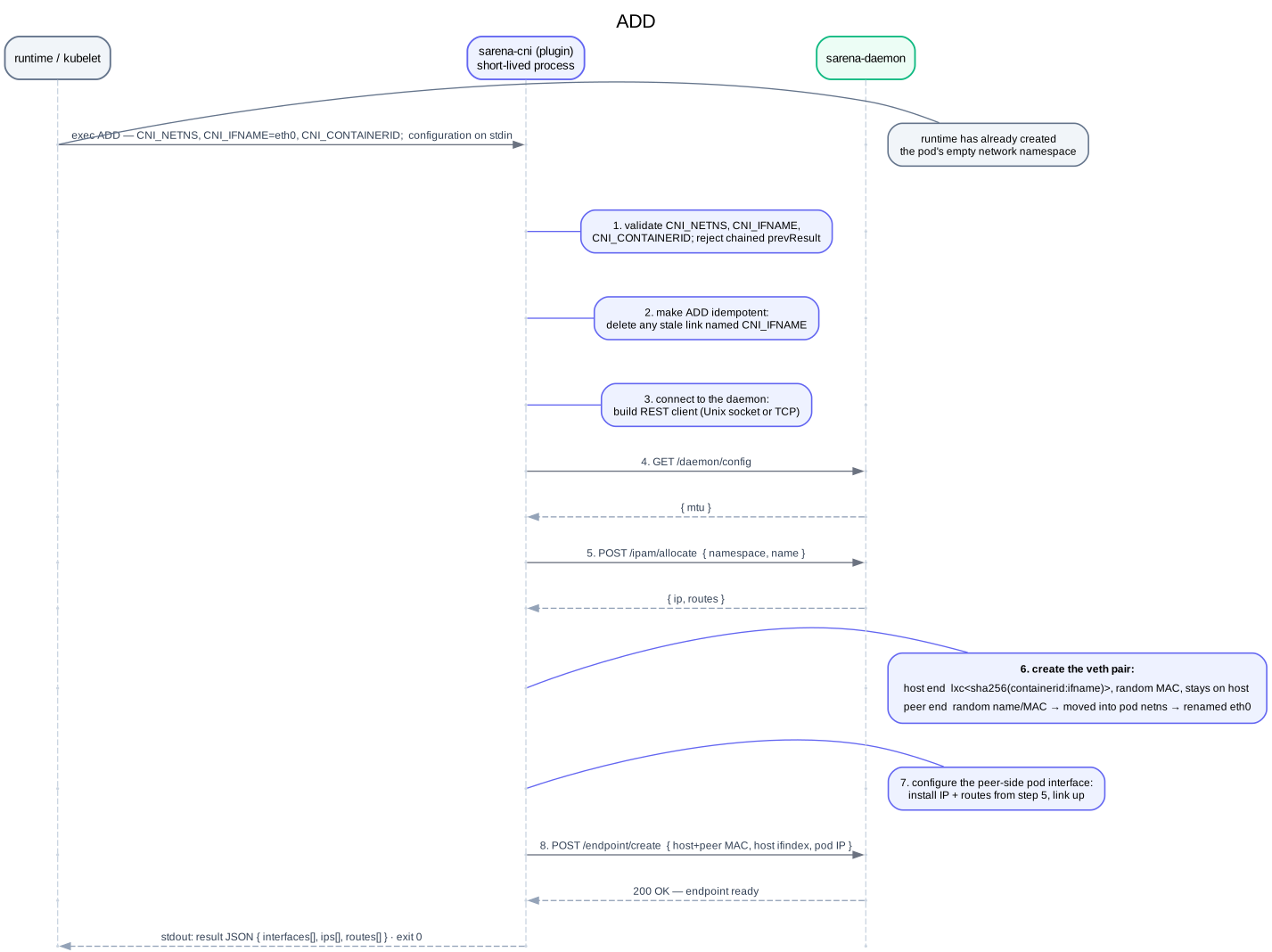
The Sarena plugin performs the following steps in order:
1. Validate input parameters — Checks whether CNI_NETNS, CNI_IFNAME, and CNI_CONTAINERID are present. If any of them are missing, the plugin exits with an error message on stderr. It also checks whether a prevResult is present. Since Sarena does not support plugin chaining, its presence results in an error and the process exits unsuccessfully.
2. Make ADD idempotent — Opens the target network namespace specified by CNI_NETNS and deletes any pre-existing link with the target name specified by CNI_IFNAME. It is fine if the link does not exist.
3. Connect to the Sarena daemon — Builds a REST client that typically connects through a Unix domain socket, or alternatively through TCP. The endpoint can be configured in the .conflist configuration file.
4. Fetch daemon configuration — Fetches the daemon configuration using GET /daemon/config. Currently, only the MTU is part of this configuration, but in the future other relevant settings, such as GRO, may be retrieved here.
5. Allocate an address from the daemon — Requests the daemon to allocate an IP address for the interface being provisioned using POST /ipam/allocate. The request includes the Pod namespace (K8S_POD_NAMESPACE) and Pod name (K8S_POD_NAME), allowing the daemon to allocate an IP based on these parameters. For example, it could allocate an address from an IP pool associated with a particular namespace.
The daemon returns not only the IP address for the interface, but also the routes needed to reach the dataplane, as discussed in Basic eBPF forwarding.
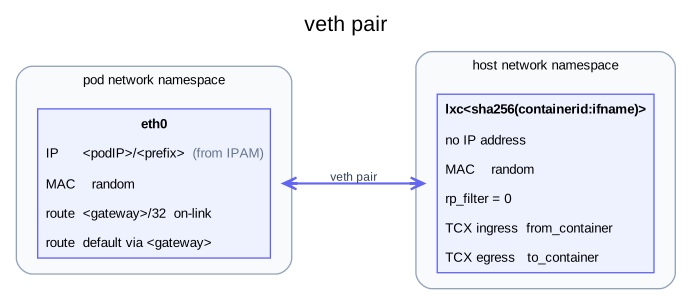
6. Create the veth pair — Creates the following veth pair:
-
Host end — Named
lxc<sha256(containerid:ifname)>and assigned a random MAC address. This end remains in the host network namespace. The plugin configures the MTU using the value obtained from the daemon, disables reverse path filtering (rp_filter), and brings the interface up. This is where the eBPF programsfrom_containerandto_containerare attached. The actual attachment is performed by the daemon, not by the plugin. -
Peer end — Initially given a random name, which is later replaced with the requested interface name. It is also assigned a random MAC address. This end is moved into the new container network namespace and then renamed to the requested name, usually
eth0. The MTU is configured as well. Since the network configuration is not yet complete, the interface is not brought up at this point. No eBPF program is attached to this endpoint.
See also: Host routing.
Initially, this had a bug: I named the peer-side interface before moving it into the container network namespace. Since container-side interfaces are typically called eth0, there could be multiple interfaces called eth0 in the host namespace before they were moved into their respective container namespaces. Since interface names must be unique within a network namespace, this was a bug.
7. Configure the peer-side Pod interface — Installs the IP address and routes obtained from the daemon in step 5 on the Pod interface and brings the interface up.
8. Register the endpoint with the daemon — The final step is to register the endpoint with the daemon using POST /endpoint/create. The daemon receives several parameters, including the interface names and MAC addresses of both sides of the veth pair, as well as the IP address of the Pod side. The host side does not have an IP address.
When this call succeeds, the endpoint is considered ready.
What happens if ADD fails after IP allocation?
There is an important failure case to consider. What happens when an IP address is allocated in step 5, but something goes wrong before step 8 is reached?
The daemon initially has no way of knowing that the ADD operation failed. As a result, the allocated IP address would remain allocated indefinitely.
The veth pair is different. It is created by the plugin, so the plugin can clean it up itself if the ADD operation fails before the endpoint is registered with the daemon. This does not require the daemon to know that the operation failed.
As a result, the daemon can remain consistent: it only considers an endpoint to exist after the POST /endpoint/create call succeeds, while the plugin is responsible for cleaning up the resources it created if the operation fails before that point.
There are two possible solutions:
-
Use a timeout in the daemon - When the IP is allocated in step 5, the daemon starts a timer. If the endpoint is not registered with the daemon in step 8 before the timer expires, the IP address is released.
-
Use a drop guard in the plugin - Rust provides RAII-style cleanup through Drop. A guard can be created when the IP is allocated and, if the operation fails before the endpoint is successfully registered, the guard can call the appropriate
DELETEoperation on the daemon to release the allocated IP address.
For now, Sarena uses the second approach. Keeping track of allocation timers in the daemon was not trivial at the time of writing, whereas the drop guard provides a relatively simple way for the plugin to clean up resources when the ADD operation fails.
The result JSON
When the CNI plugin successfully completes the ADD operation, it returns a CNI result as JSON on stdout. The container runtime uses this result to learn about the network configuration created by the plugin.
For example, Sarena returns:
{
  "cniVersion": "1.0.0",
  "interfaces": [
    { "name": "lxc9f3a…c1",  "mac": "b6:1d:…:04" },
    { "name": "eth0",        "mac": "9a:54:…:a7", "sandbox": "/var/run/netns/cni-1f2e…" }
  ],
  "ips": [
    { "interface": 1,
      "address":  "10.0.10.30/24",
      "gateway":  "10.0.0.7" }
  ],
  "routes": [
    { "dst": "10.0.0.7/32" },
    { "dst": "0.0.0.0/0", "gw": "10.0.0.7", "mtu": 1500 }
  ],
  "dns": {}
}
Reading it:
-
cniVersion- the version of the CNI specification that this result conforms to. -
interfaces— an array describing the network interfaces created by the plugin. Sarena creates two interfaces as a veth pair:index 0- the host-side interface and its MAC address. It has no sandbox field because it remains in the host network namespace.index 1- the peer-side interface, together with its MAC address and the sandbox path provided by the runtime.
-
ips— the IP address allocated by Sarena’s IPAM, represented as a CIDR, together with the gateway. The interface field refers to the corresponding entry in the interfaces array. Since only the peer-side interface (index 1) has an IP address, the result contains only this IP address. Both 10.0.10.30/24 and the gateway (10.0.0.7) come from the daemon. -
routes— the two routes that the plugin installed in the Pod’s network namespace. See also: Basic eBPF forwarding -
dns— empty. Sarena does not manage DNS. Kubelet provides the Pod with the cluster DNS configuration separately.
DEL, CHECK and STATUS, briefly
The ADD command is the most interesting one. Three operations remain to be discussed: DEL, CHECK, and STATUS. They are considerably simpler, so they are described only briefly here.
-
DEL— After checking thatCNI_NETNS,CNI_IFNAME, andCNI_CONTAINERIDare present, the plugin connects to the Sarena daemon. It then makes a singleDELETErequest usingCNI_CONTAINERIDandCNI_IFNAMEto identify the endpoint that should be removed. This also releases the IP address allocated during theADDoperation. Finally, the plugin destroys the veth pair that was created duringADD. -
CHECK— RequiresprevResult, which is provided by the runtime and contains the CNI result previously returned by the plugin. Sarena uses this result to determine the expected network configuration and checks whether the IP address assigned to the peer-side veth interface (the Pod IP address) is still correct. -
STATUS— Connects to the Sarena daemon and sends aGETrequest to/daemon/health. If the request succeeds, the daemon is considered ready to handle new endpoints.
Note that
DELis currently a best-effort operation. What happens if the daemon is temporarily unavailable? In that case, the endpoint cannot be deleted from the daemon, so the daemon continues to consider the endpoint to exist.A possible solution would be to keep track of endpoints that still need to be removed. The plugin could store the
CNI_CONTAINERIDandCNI_IFNAMEon disk when aDELoperation cannot be completed. Each subsequentDELcall would then not only try to remove the current endpoint, but also check whether there are previously failed deletions that need to be retried.The daemon could process these deletions in batches and treat already-deleted endpoints as a successful outcome. This would make
DELmore resilient to temporary daemon failures.This mechanism is not currently implemented in Sarena.
Conclusion
The CNI plugin is a relatively small but important part of Sarena. Its main responsibility is to translate the CNI operations from the container runtime into the network configuration that Sarena needs.
The plugin itself is intentionally short-lived. It performs the work required for each CNI operation and then exits. The Sarena daemon, on the other hand, provides the long-lived state and functionality that cannot live inside the plugin, such as IP address allocation, endpoint tracking, and loading the eBPF programs.
The ADD operation ties these pieces together: the plugin creates the veth pair and configures the Pod interface, while the daemon provides the configuration and IP address and ultimately registers the endpoint. DEL, CHECK, and STATUS provide the corresponding lifecycle and health operations.
There are still areas that can be improved, particularly around handling failures and making DEL more resilient when the daemon is temporarily unavailable. But with the basic CNI integration in place, Sarena can participate in the standard container networking lifecycle without requiring Kubernetes-specific networking code in the plugin itself.
The code is in: https://github.com/erwin-kok/sarena